
Everyday PDF tasks
Compress a PDF without losing readability
A measured fictional compression example, with settings and checks for small text and image quality.
RedactNinja guide. Updated 23 September 2026.
A smaller PDF is useful only if the recipient can still read it. Compression may rewrite the document structure, reduce image quality or reduce image resolution. Those operations have different effects.
One measured example
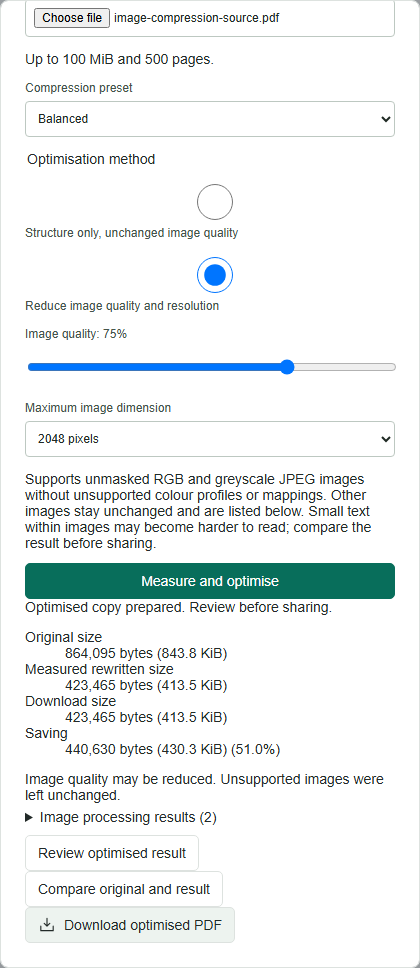
On 23 September 2026 we ran the Balanced preset against a synthetic one-page PDF containing a JPEG, a PNG and selectable text. The settings were 75% image quality and a maximum image dimension of 2048 pixels. Unsupported images were retained unchanged.
- Original
- 864,095 bytes
- Downloaded output
- 423,465 bytes
- Reduction in this test
- 51%
This is a reproducible test result, not an average or guaranteed saving. A PDF containing mostly text, previously compressed pictures or unsupported image types may shrink little or not at all.
Choose settings conservatively
- Open Compress PDF, select your document and start with Balanced.
- Choose Measure and optimise. Compare the original and download sizes, and read the image processing messages.
- Use Compare original and result. Inspect the smallest lettering and the most detailed image, not just the first page at fit-to-width.
- If fine print or diagrams become unclear, choose a higher quality setting or keep the original.
Check for the right kind of loss
Look for blurry scanned text, blocky edges, faded marks and unreadable labels. Selectable PDF text can remain sharp while text inside an image becomes difficult to read. Check both. Where the PDF will be printed, inspect it at the intended paper size.
Structure-only optimisation avoids intentionally reducing image quality, but may offer less saving. An image listed as unsupported is not necessarily missing: check whether the tool says it was left unchanged. Never ignore a message that says processing failed or the output is incomplete.
Keep a usable original
Do not repeatedly compress the previous output while trying different settings. Start again from the original so each comparison uses the same source. Compression is not redaction and does not establish that metadata or sensitive content has been removed.