
Everyday PDF tasks
Why you cannot select text in a PDF
Identify scanned pages, use OCR and check the recognised text before relying on search.
RedactNinja guide. Updated 23 September 2026.
A PDF can look like a typed document while containing only pictures of its pages. There may be no text objects for the viewer to select. Optical character recognition, or OCR, attempts to turn those pictures into searchable text.
Check the page before choosing a tool
Try selecting a sentence and searching for a distinctive visible word. If neither works, the page may be a scan. That is not conclusive: restrictions, unusual font encoding and viewer behaviour can also interfere. A PDF can contain both searchable and scanned pages, or a mixture on the same page.
Work through a scan
- Keep your source document and open OCR PDF in the PDF tools library.
- Select the PDF. Correct orientation and poor scan alignment where necessary, and check the language options available in the OCR workflow.
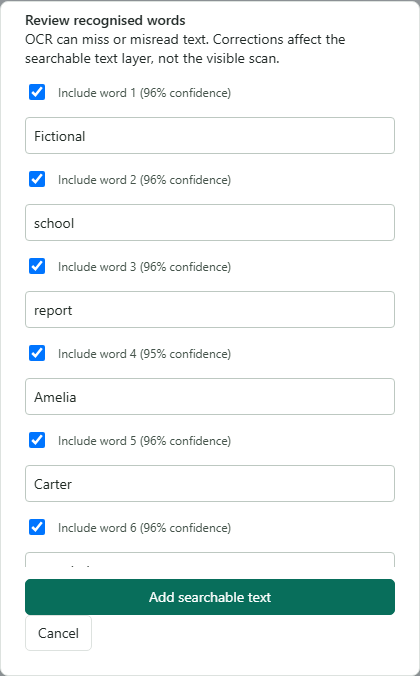
- Review the recognised words against the visible scan. Correct mistakes or exclude an incorrect recognition before adding searchable text.
- Download the output, reopen it and search for several words from different parts of the page.
Names and numbers deserve extra attention
A clear-looking scan can still produce a wrong name, a missing decimal point or a confused letter and number. Check identifiers, dates and monetary amounts individually. A high confidence value is the recogniser's estimate, not independent proof of accuracy.
Tables are particularly awkward because correct words can appear in the wrong reading order. Copy a short section into a plain text view and check which row and column each value belongs to. Do not assume that searchable text recreates an editable spreadsheet.
Understand what you changed
Correcting the recognised text changes the searchable layer, not necessarily the visible scan. The image can still display an old spelling. Avoid repeatedly adding text to a page that already has a usable text layer, which can lead to duplicated search or selection results.
If the source is blurred, clipped or missing part of a page, obtaining a better scan may be more effective than repeating OCR. For disclosure work, read the page visually as well as searching it. OCR cannot establish that every personal detail was found.